Rokasgrāmata Endorfy EY5B005 Thock TKL Wireless Tastatūra

Nepieciešama rokasgrāmata savam Endorfy EY5B005 Thock TKL Wireless Tastatūra? Zemāk var apskatīt un bez maksas lejupielādēt PDF rokasgrāmatu latviešu valodā. Šim produktam pašlaik ir 2 bieži uzdotie jautājumi, 0 komentāri un 0 balsis. Ja šī nav jūsu vēlamā rokasgrāmata, lūdzu, sazinieties ar mums.

Vai jūsu produkts ir bojāts, un rokasgrāmatā nav sniegts risinājums? Dodieties uz Repair Café, lai veiktu bezmaksas remontu.

Rokasgrāmata

Loading…
+
=
=
=
+
+
=
+
=
+
=
+
+
=
BT2
BT3
BT1
BT1
BT1
BT1
BT2
BT3
BT2
BT3
BT3
BT2
Thock TKL Wireless
MECHANICAL GAMING KEYBOARD
CUSTOMER SERVICE
ENDORFY.COM/CONTACT
DETAILED INFO
ENDORFY.COM/KB/EYBTHOCKTKLWIRELESS
  
EN
WIRELESS MODE (Bluetooth & 2.4G)
Connection in the 2.4G mode (USB receiver)
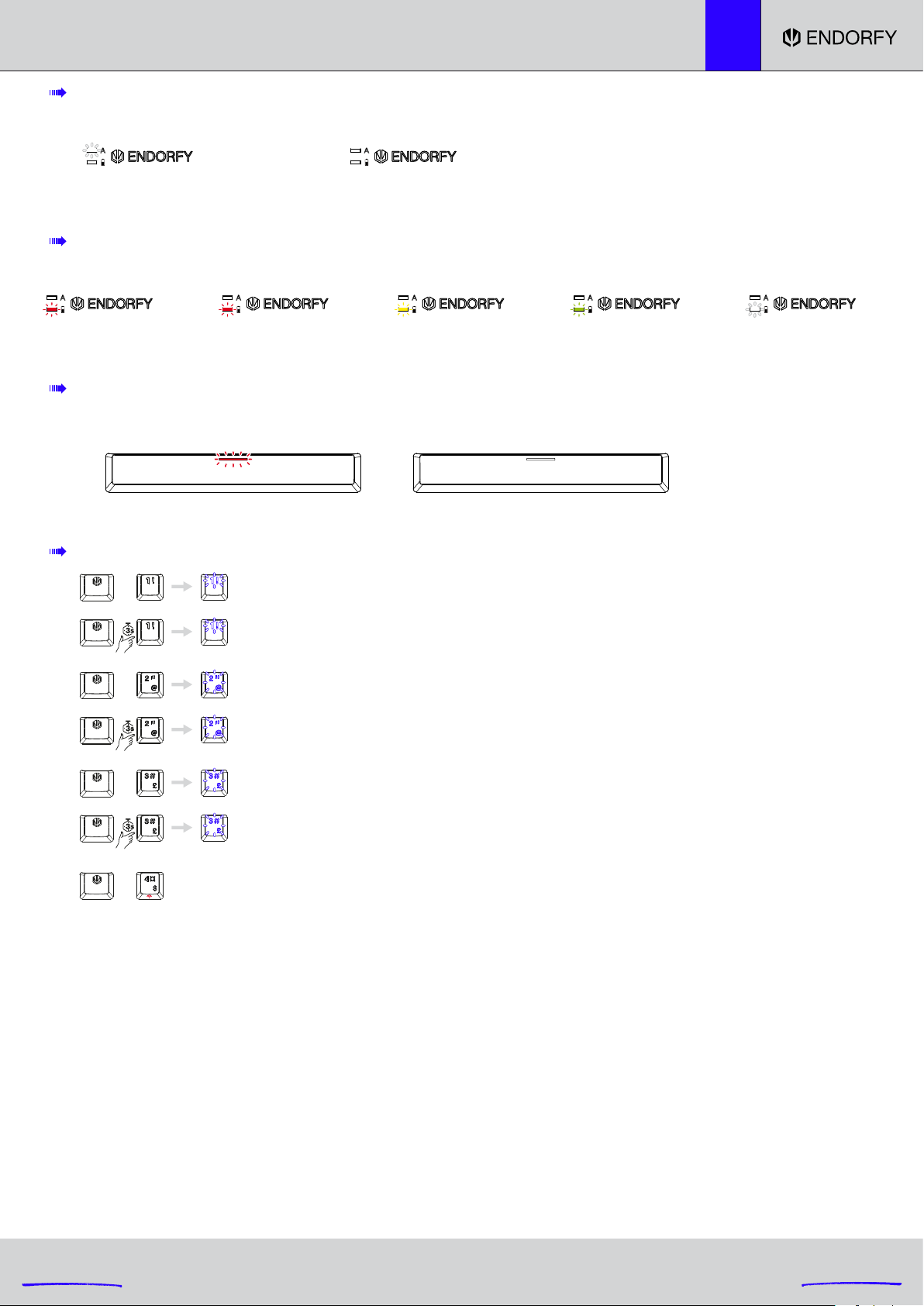
Pairing Bluetooth 2 device: The [2 @] key turns white and starts blinking. After successful pairing,
the [2 @] key will once again turn the same colour as the keyboard backlight from before pairing.
After failed pairing, the pairing mode will be switched o after 180 seconds.
The [2 @] key will once again turn the same colour as the keyboard backlight from before pairing.
Pairing Bluetooth 1 device: The [1 !] key turns white and starts blinking. After successful pairing,
the [1 !] key will once again turn the same colour as the keyboard backlight from before pairing.
After failed pairing, the pairing mode will be switched o after 180 seconds.
The [1 !] key will once again turn the same colour as the keyboard backlight from before pairing.
Selecting Bluetooth 2 device
Selecting Bluetooth 1 device
Pairing Bluetooth 3 device: The [3 #] key turns white and starts blinking. After successful pairing,
the [3 #] key will once again turn the same colour as the keyboard backlight from before pairing.
After failed pairing, the pairing mode will be switched o after 180 seconds.
The [3 #] key will once again turn the same colour as the keyboard backlight from before pairing.
Selecting Bluetooth 3 device
After the first pairing, during the following connection, the [1 !], [2 @] or [3 #] key (depending on the selected device: BT1, BT2 or BT3) will be backlit
in white. After successful pairing, the [1 !], [2 @] or [3 #] key (depending on the selected device: BT1, BT2 or BT3) will turn the same colour as the
keyboard backlight. If the keyboard cannot be paired with the selected device within 180 s, the pairing mode will be disabled. Then, the [1 !], [2 @] or
[3 #] key (depending on the selected device: BT1, BT2 or BT3) will turn the same colour as the keyboard backlight.
In the wireless mode (Bluetooth and 2.4G), if the keyboard is not used for 5 minutes, the device will enter the first level of the sleep mode, and LED
backlight will be disabled. Press any button to switch the LED backlight of the keyboard back on after the device has entered the first level of sleep
mode.
In the wireless mode (Bluetooth and 2.4G), if the keyboard is not used for 30 minutes, the device will enter the second level of the sleep mode, and
LED backlight will be disabled along with Bluetooth communication. Then, press any button to switch the LED backlight of the keyboard and
Bluetooth communication back on after the device has entered the second level of sleep mode.
BATTERY SUPPLY (ONLY IN WIRELESS MODE)
BATTERY CHARGE INDICATOR
(WIRELESS MODE WITH THE CABLE CONNECTED; WIRED MODE, ACTIVE WHEN THE KEYBOARD IS OFF)
CAPS LOCK INDICATOR
Caps on
white
0-100%
red
Fully charged
o
Caps o
o
Low battery 0-20% 20-50% 50-90%
blinking red red yellow green
90-100%
white
NO
Lejupielādēt rokasgrāmatu latviešu valodā (PDF, 8.86 MB)
(Apsveriet ietekmi uz vidi un drukājiet šo rokasgrāmatu tikai tad, ja tas patiešām ir nepieciešami)

Loading…

Vērtējums

Paziņojiet mums, ko jūs domājat par Endorfy EY5B005 Thock TKL Wireless Tastatūra, novērtējot produktu. Vai vēlaties dalīties pieredzē ar šo produktu vai uzdot jautājumu? Ievadiet savu komentāru lapas apakšdaļā.
Vai esat apmierināts ar Endorfy EY5B005 Thock TKL Wireless Tastatūra?
Novērtējiet šo produktu pirmais
0 vērtējumi

Pievienoties sarunai par šo produktu

Šeit varat dalīties savās domās par Endorfy EY5B005 Thock TKL Wireless Tastatūra. Ja jums ir jautājumi, vispirms rūpīgi izlasiet rokasgrāmatu. Rokasgrāmatu var pieprasīt, izmantojot mūsu saziņas veidlapu.

Vairāk par šo rokasgrāmatu

Mēs saprotam, ka ir patīkami, ka jūsu Endorfy EY5B005 Thock TKL Wireless Tastatūra ir papīra rokasgrāmata. Jūs vienmēr varat lejupielādēt rokasgrāmatu no mūsu vietnes un pats to izdrukāt. Ja vēlaties saņemt oriģinālo rokasgrāmatu, iesakām sazināties ar Endorfy. Viņi varētu nodrošināt oriģinālu rokasgrāmatu. Vai meklējat sava Endorfy EY5B005 Thock TKL Wireless Tastatūra rokasgrāmatu citā valodā? Izvēlieties vēlamo valodu mūsu mājaslapā un meklējiet modeļa numuru, lai redzētu, vai tas ir pieejams.

Specifikācijas

Zīmols Endorfy
Modelis EY5B005 Thock TKL Wireless
Kategorija Tastatūras
Faila veids PDF
Faila lielums 8.86 MB

Visas rokasgrāmatas par Endorfy Tastatūras
Citas Tastatūras rokasgrāmatas

Bieži uzdotie jautājumi par Endorfy EY5B005 Thock TKL Wireless Tastatūra

Mūsu atbalsta komanda meklē noderīgu informāciju par produktu un atbild uz bieži uzdotajiem jautājumiem. Ja atrodat ko nepareizu bieži uzdotajos jautājumos, informējiet mūs, izmantojot saziņas veidlapu.

Burti uz tastatūras neatrodas tajās vietās, pie kurām esmu pieradusi, kāpēc tā? Apstiprināts

Lielākā daļa tastatūru izmanto QWERTY izkārtojumu, kas apzīmē pirmos sešus tastatūras burtus. Tomēr ir dažādi tastatūras izkārtojumi, kas atbilst noteiktas valodas īpašajām vajadzībām. Iespējams, ka ir nomainīti arī tastatūras taustiņi. Īpaši ar vecākām tastatūrām tas ir viegli izdarāms.

Tas bija noderīgi (1358) Lasīt vairāk

Kāds ir labākais veids, kā tīrīt manu tastatūru Apstiprināts

Nekad neievietojiet priekšmetus starp taustiņu malām, jo ​​tas galvenokārt iespiedīs netīrumus un sabojās tastatūru. Tastatūru vislabāk ir tīrīt ar saspiestu gaisu, vienlaikus turot tastatūru otrādi. Taustiņu augšpusi var notīrīt ar nedaudz mitru drānu.

Tas bija noderīgi (201) Lasīt vairāk
Rokasgrāmata Endorfy EY5B005 Thock TKL Wireless Tastatūra

Saistītie produkti

Saistītās kategorijas

×
Download