6
EN
9
p w
e
q
r t
y
1
1
1
u
1
2
3
4
6
5
io
;sfh
dg
1
2
3
11
a
1
1
1
2
• The contents of this document
may be changed in the future
without advanced notice. Contact
our Customer Support Center for
the latest information relating
to product names and model
numbers.
• The utmost care has been taken to
ensure the integrity of the contents
of this document. In the unlikely
event that a questionable item,
error, or omission is found, please
contact our Customer Support
Center.
• Any liability for passive damages or
damage of any kind occurred due to
data loss incurred by a defect of the
product, repair performed by the
third party other than Olympus or an
Olympus authorized service station,
or any other reason is excluded.
Safe and Proper Usage
Before using your new recorder,
read this manual carefully to ensure
that you know how to operate it
safely and correctly. Keep this
manual in an easily accessible
location for future reference.
• The warning symbols indicate
important safety related information.
To protect yourself and others from
personal injury or damage to property,
it is essential that you always read the
warnings and information provided.
Getting Started
Identification of Parts
1 Built-in Microphone
2
MIC
(Microphone) jack
3
HOLD
switch
4
STOP
(4) button
5
PLAY
(` ) button
6 0 (Rewind) button
7 Battery cover
8
FOLDER
/
INDEX
button
9
EAR
(Earphone) jack
0 Display (LCD panel)
! Record/play indicator light
@
REC
(s ) button
#
+
button
$ 9 (Fast Forward) button
%
–
button
^
DISP
/
MENU
button
&
ERASE
(s ) button
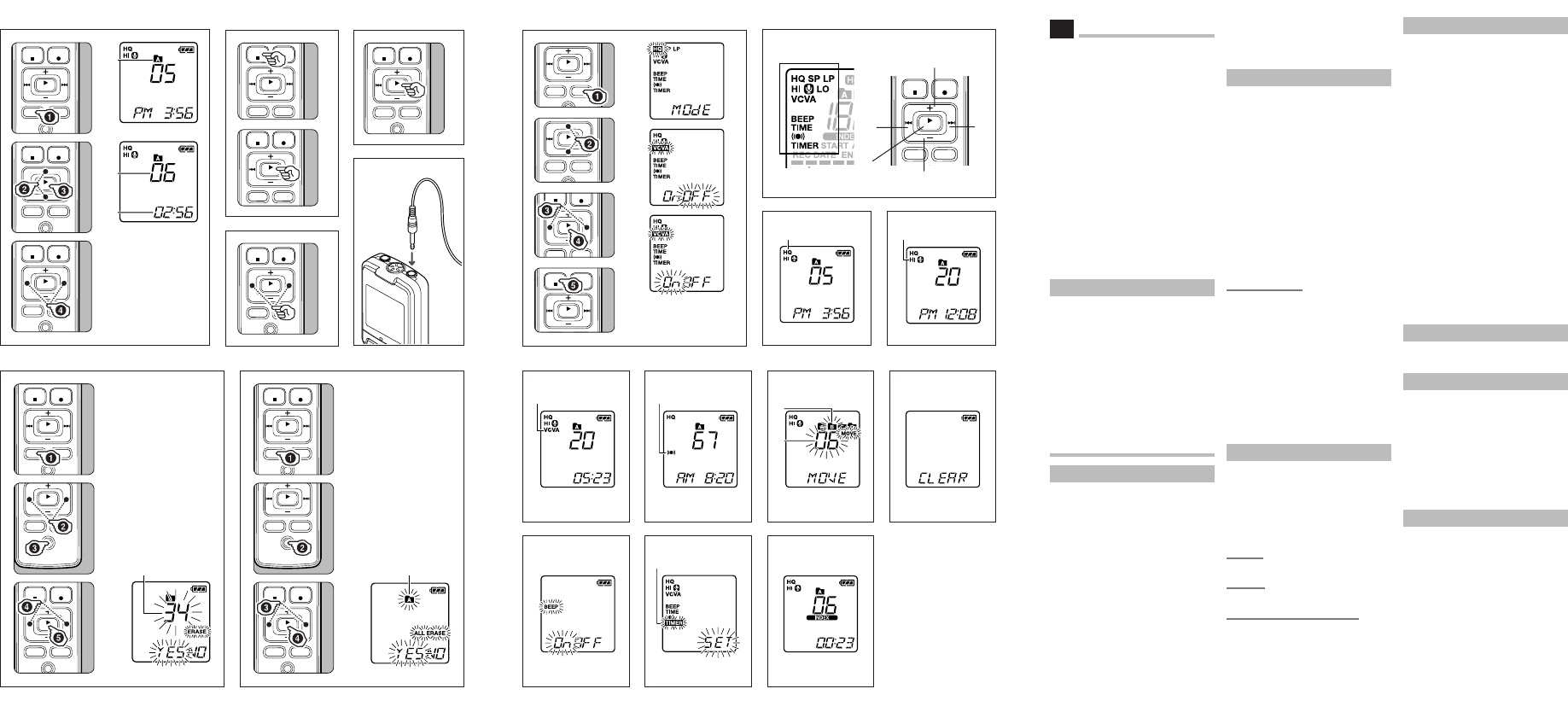
Inserting Batteries (Fig. 1)
1 Press down on the arrow and slide the
battery cover open.
2 Insert two size-AAA alkaline batter-
ies, observing the correct polarity.
3 Close the battery cover completely.
• Time and date display appears.
• The “Hour” indicator flashes,
indicating the start of the time
and date setup process (See
“Setting Time and Date [TIME]”
for details).
1 Built-in speaker
An optional Ni-MH Rechargeable
Battery (BR401) from Olympus can
be used for the recorder.
Replacing Batteries:
When [N] appears on the display,
replace the batteries as soon
aspossible. Size-AAA alkaline batteries
are recommended. When the batteries
are depleted, [O] appears on the
display, and the recorder shuts off.
It is recommended to set the HOLD
switch to the [HOLD] position before
you replace batteries to maintain the
currentsettings (Time and date, etc.).
For your convenience, the recorder also
logs the current settings in nonvolatile
memory at hourly intervals.
Power Supply (Fig. 2)
The HOLD switch functions as a
power button. When you do not use
the recorder, set the HOLD switch
to the [HOLD] position while the
recorder is stopped. This will power
off the recorder and minimizethe
battery drain.
Power on:
Reset the
HOLD
switch.
Power off:
Set the
HOLD
switch to the [
HOLD
] position.
Standby Mode and Display Shut Off:
If the recorder is stopped or paused for
60 minutes or longer during recording
or play back, it goes into Standby
(power-save) mode, and the display
shuts off. To exit Standby mode and
turn on the display, press any button.
Hold
Set the HOLD switch to the [HOLD]
position. All operation buttons are
disabled. This feature is useful when
the recorder has to be carried in a
handbag or pocket. Remember to reset
the HOLD switch before attempting to
use the recorder.
Notes:
• The alarm will sound at the
scheduled time even if the recorder
is set to [HOLD] position. The
recorder will then begin to play the
le associated with the alarm once
you press any button.
• The recorder functions as follows
with the HOLD switch set to the
[HOLD] position:
– If the recorder is playing, the
display goes dark when playback
of the current file has completed.
– If the recorder is recording,
the display goes dark when
the recorder stops recording
automatically upon running out
of free memory.
How to Use the Strap (Fig. 3)
1 Strap hole
Strap is not supplied.
Notes on the Folders (Fig. 4)
The recorder provides four folders,
[F], [G], [H] and [I]. To change the
folder selection, press the FOLDER/
INDEX button while the recorder is
stopped. Each recorded file is stored
in a folder. Using folders to classify files
makes it convenient to find files you
want to access later. Up to a total of 100
files can be recorded in each folder.
1 Current folder
Setting Time and Date [TIME] (Fig. 5)
If you have set the time and date,
information as to when a sound file
was recorded is stored automatically
with that file.
When you install batteries for the
first time or each time you replace
the batteries, the “Hour” indication
will flash. In such a case, be sure to
set the time and date by following
steps
4
through
7
described below.
1 Press and hold the
DISP
/
MENU
button for 1 second or longer.
2 Press the
+
or
–
button to select
[
TIME
].
Introduction
EN


Pievienoties sarunai par šo produktu
Šeit varat dalīties savās domās par Olympus VN-7500 Audio atskaņotājs. Ja jums ir jautājumi, vispirms rūpīgi izlasiet rokasgrāmatu. Rokasgrāmatu var pieprasīt, izmantojot mūsu saziņas veidlapu.